Dominion Energy
Reduced time taken by internal operators in managing data heavy workflows
Role
Lead designer
Team
Client (Product Owner)
1 Product Manager
5 Engineers
Deliverables
Visual Design
Content Structure
Usability testing
Dev handoff
Overview
Dominion Energy's data sources were heavily fragmented and disconnected. They needed a way to centralize their internal data for stakeholders and employees.
Dominion Energy is Virginia's largest energy utility provider, powering homes, schools, businesses, medical centers, etc. However, various data types and sources were time-intensive to pull from. Initial focus was driven by engineering to create a technical data framework called Data Mesh with a functional front-end experience.
Problem
What's the issue?
The current platform was used as a testing ground for engineering to submit and review data as a standard user and admin user. Its current state lacked key features for consumers to operate independently without technical support. This included:
Unsupported role-based functionality
Important status updates lost in emails
Technical jargon written for non-technical operators

Focus Areas
1. Admin Dashboard
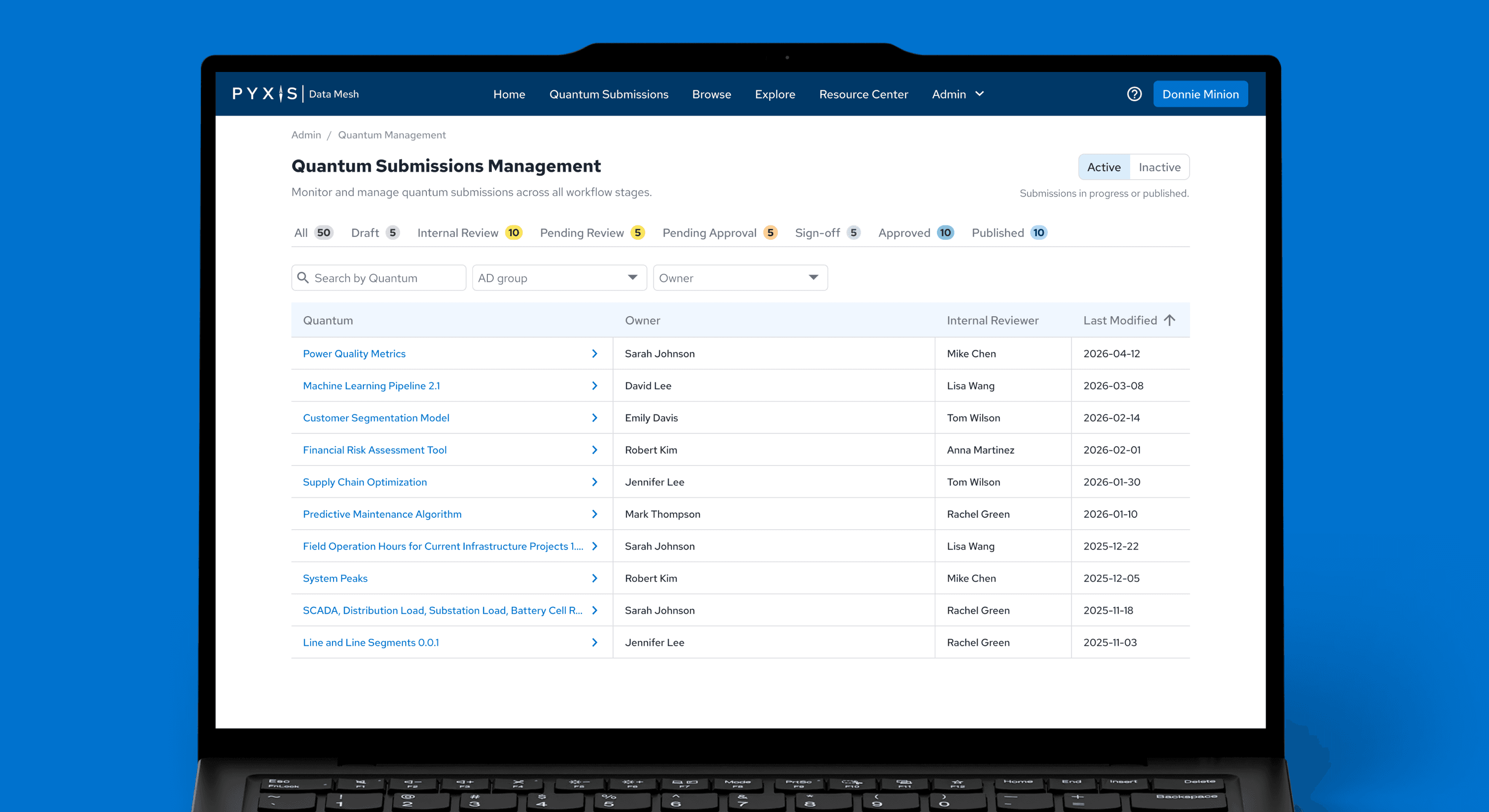
Primary focus centered on creating an admin dashboard for admin to view high-level summaries and gain quick access to priority actions. Previously, admin relied on communicating with the backend team for summarized reports.
2. Data Management
Following the Admin Dashboard, admins needed the ability to edit or deactivate data types. With custom development, we took this opportunity to create custom slide out drawers with pop up modals for quick viewing access to priority actions. The development team liked it so much, they advocated to simplify the data preview workflow to include this component for existing pages like Browse.
3. Confirmation Models
Originally, Pyxis contained 1-click action buttons for admins to save changes and submit data types. Such changes often presented high-level information that impacted connected accounts immediately. To increase admin confidence in excecuting critical tasks, I prioritized 2-click confirmaton modals with inline previews before final confirmation.
Selecting security keys before updating
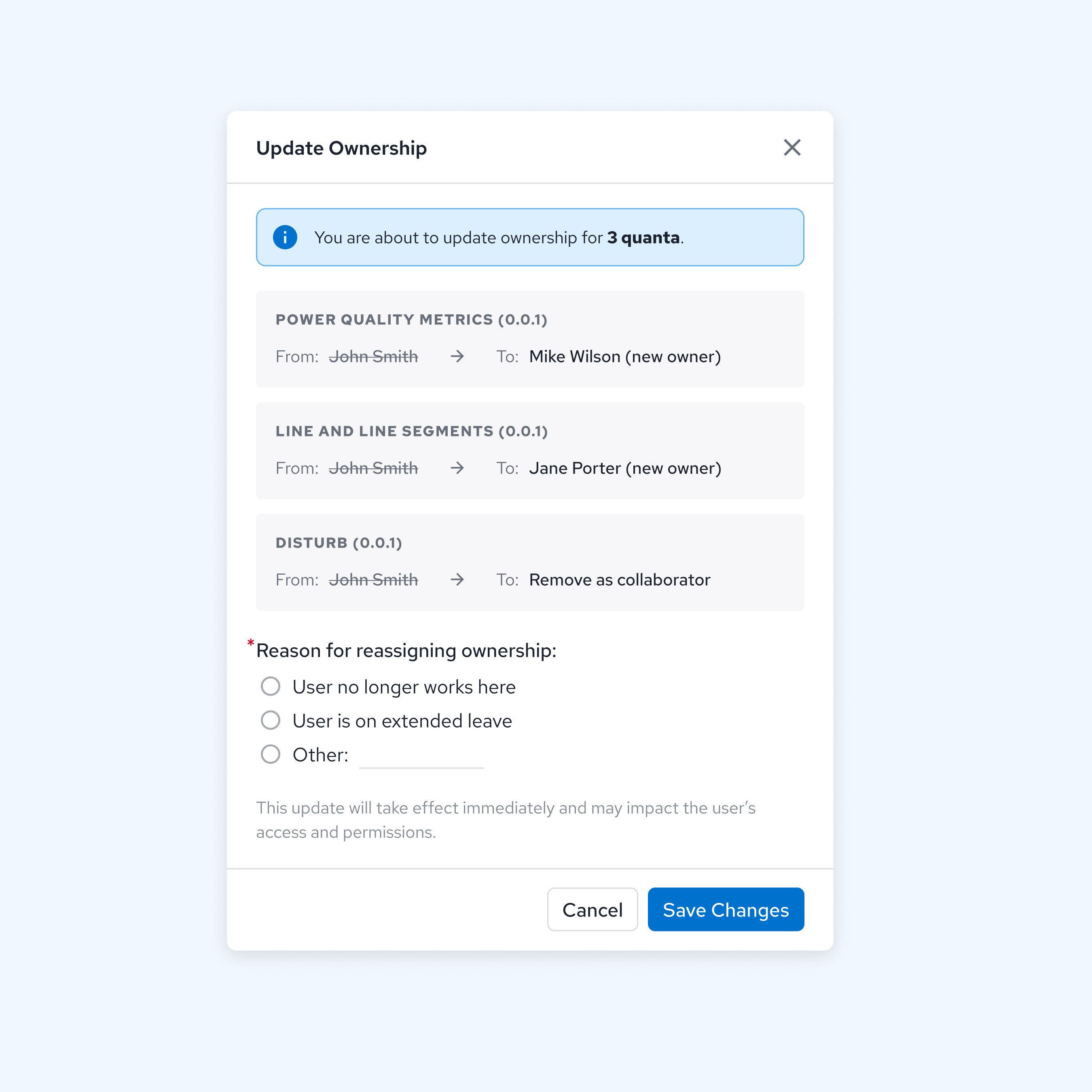
Previewing data ownership reassignment
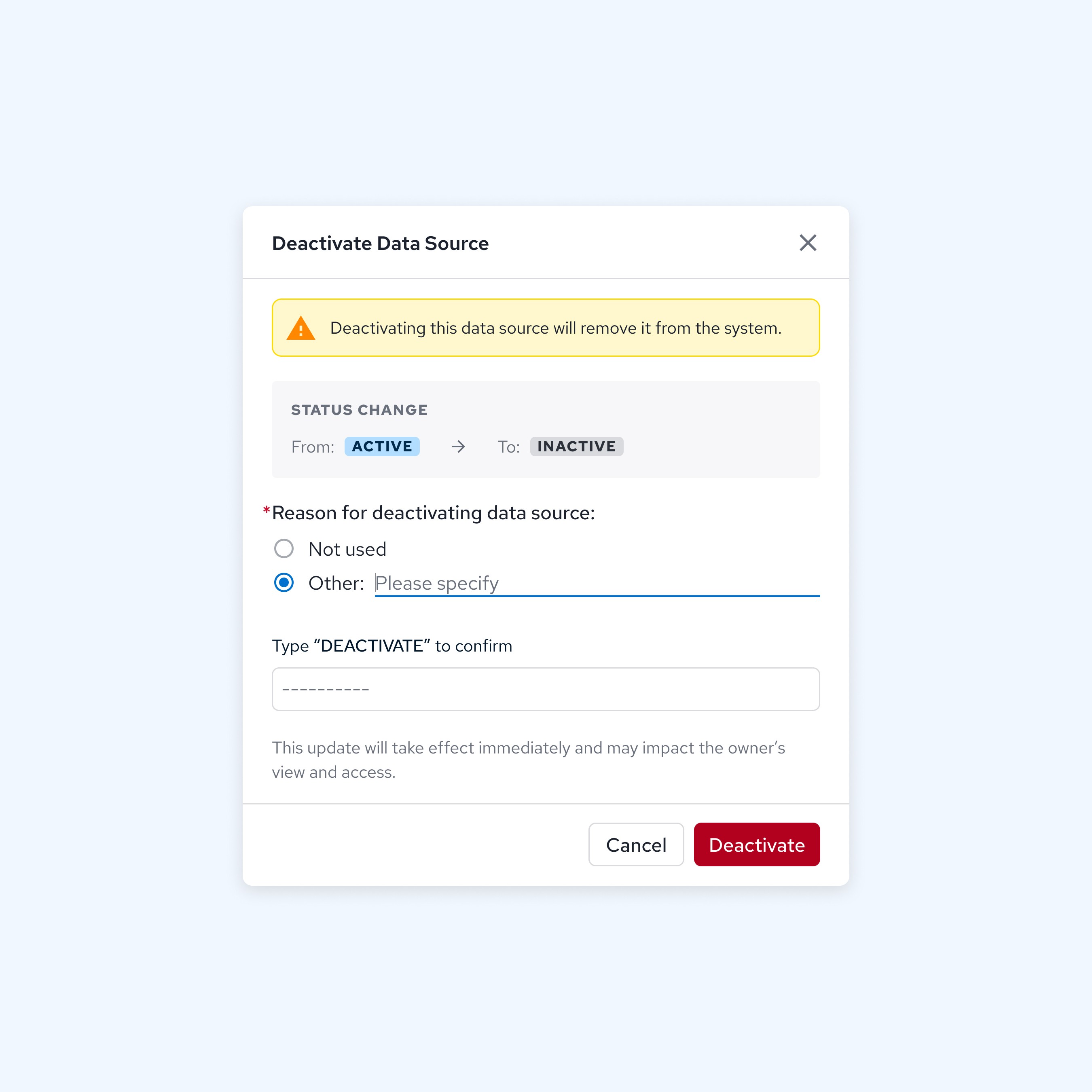
Double confirmation clearance for deactivation
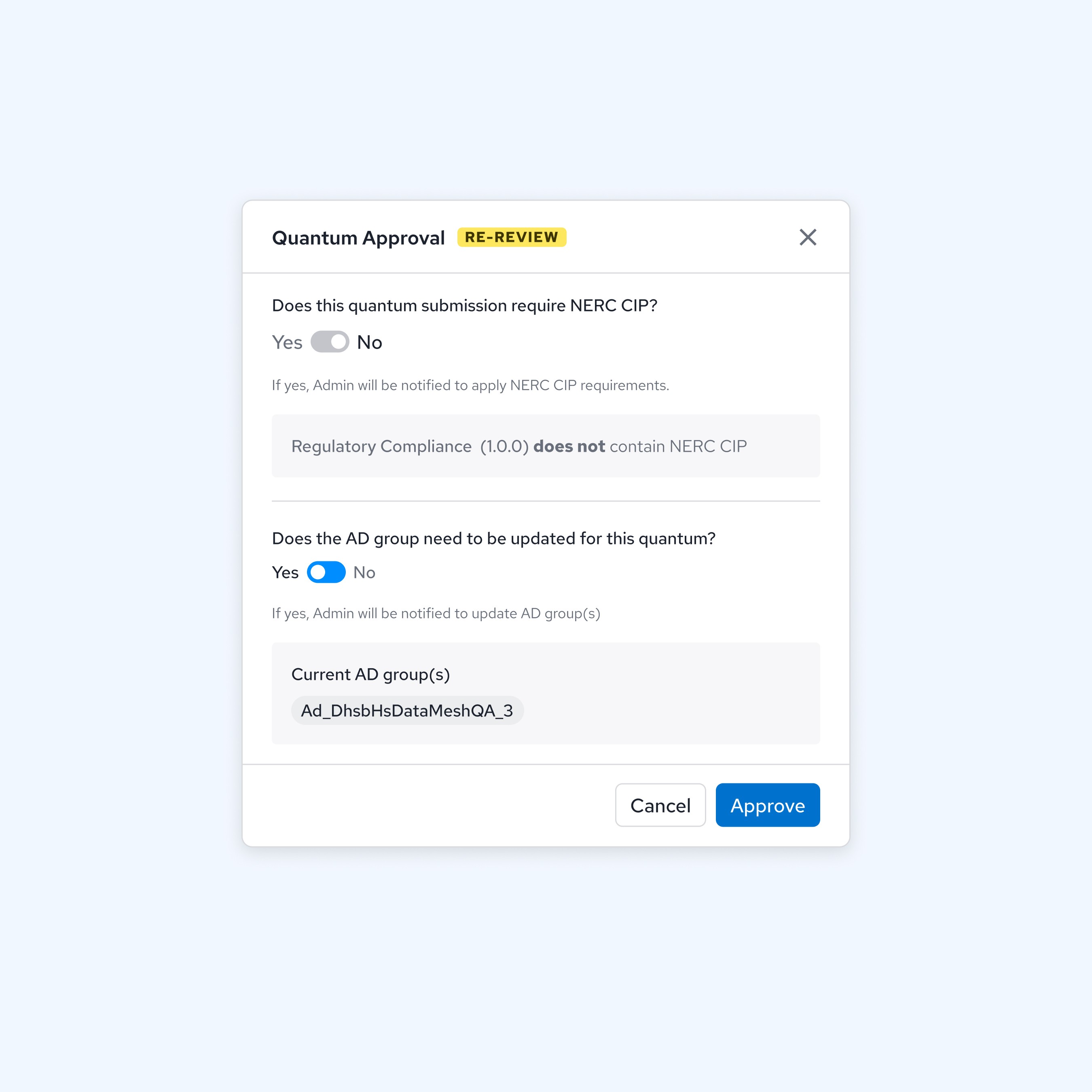
Reviewing data submission requirements
Pyxis Homepage
Iterating with feedback
As the Pyxis platform progressed, the client shifted focus to market Pyxis as a data exploration platform rather than a simple data catalogue. Pyxis required a landing page with the ability to see what's new in the platform for returning users. After initial wireframe concepts, I ran a 1:1 moderated usability testing with 8 participants.


Final homepage iteration
Feedback from 8 participants and the product manager led to:
1) Embed "Report Issue" into a help menu within the nav bar
2) Deprioritizing "My Stuff" to maximize screen real estate for published updates
3) Restructure viewing priority between resource articles and data types
4) Opportunity: Room to enhance "Bookmarked" feature

Future
Platform expansion
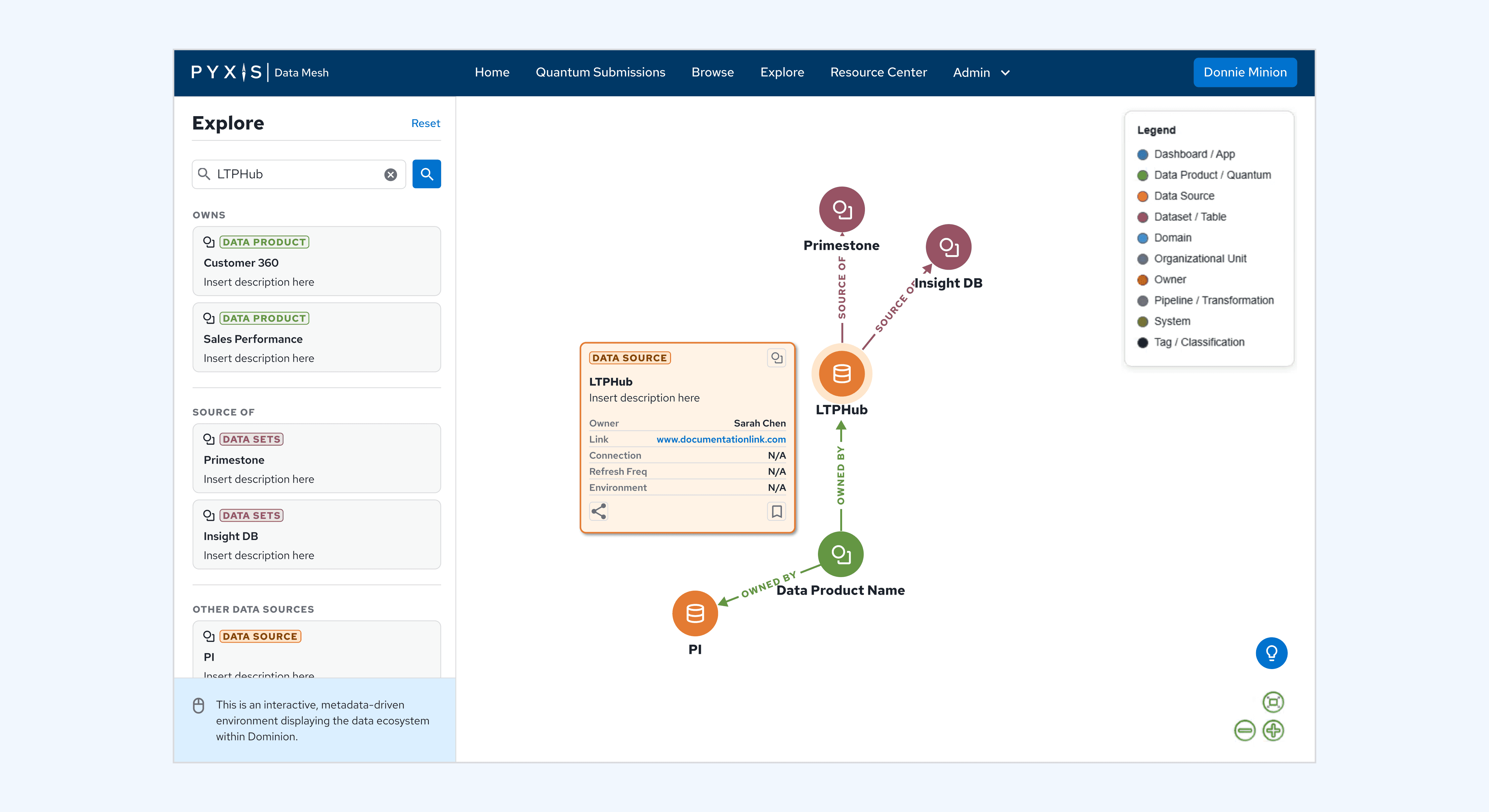
As my contract was ending, I had the pleasure of creating early-stage concepts for the interactive Explore page. This set the stage for the client, engineering, and their returning designer to discuss and iterate on the core feature of Pyxis — providing Dominion Energy's employee network the ability to search and source specific data across multiple regions, teams, and data sources.
Present
Onboarding
With Admin and Homepage currently in development, I onboarded the returning designer early concepts of the Explore feature.
Future
Product Launch
Pyxis aims to launch in 2027 with the overarching goal of reducing dependency on external technical operators.
Future
Measuring Performance
KPI's will likely focus on admin efficiency, platform adoption, data submission quality, and self-service success.
Thoughts
Key Takeaways
This project required me to be detail-oriented, organized, and collaboration heavy with the product manager and engineering to connect the user's end-to-end experience via complex workflows. Overall, the client was happy with our partnership and I enjoyed paving the way in building out the first iteration of the product.
A Newcomer to the Domain
Because I was new to how the product was originally built, I was able to bring an unbiased perspective to the end user experience. This allowed me to explore multiple solutions to logic based flows, often improving existing UX or charting new ones for future ideas.
Measuring Performance
Early on in the project, I advocated for usability testing before development hand-off. After a successful pilot test with the client as the participant, we baked user testing into the design phase making sure we allowed time to collect user feedback prior to development hand-off.